Report Automation Tools and Lead Routing Automation for Small RevOps Teams: What Each Category Handles
Report automation tools and lead routing software by category: what each handles, where manual judgment starts, and what a team of one should set up first.
Request a quote and our experts will contact you within 24 hours with tailored solutions and pricing.
Report Automation Tools and Lead Routing Automation for Small RevOps Teams: What Each Category Handles
By RevOps for B2B SaaS Editorial Team | Last updated: November 4, 2026
Report automation tools are software that connect to a customer relationship management (CRM) system, refresh pipeline data on a schedule, and deliver finished dashboards to stakeholders, so revenue operations (RevOps) teams stop rebuilding weekly reports by hand.
For a B2B SaaS team, the cost is plain. In a 2025 survey of 180 RevOps professionals, 23% said they work alone (Revenue Wizards, 2025). Every hour spent rebuilding a pipeline report or assigning a lead by hand comes out of analysis time. This guide sorts report automation tools and lead routing automation software into categories, shows what each handles, and marks where manual judgment still belongs. It names no vendors.
Key Takeaways
Report automation tools fall into four categories: CRM-native dashboards, BI tools, spreadsheet connectors and scheduled report generators.
Lead routing automation software handles territory rules, round-robin rotation, account ownership and SLA timers, but people still write the rules.
Automated reports and routing rules repeat whatever the CRM data says, and 80% of surveyed RevOps respondents report missing or incomplete data.
A RevOps team of one should usually automate the weekly pipeline report first, then routing, unless inbound leads are waiting.
Which report automation tools replace a weekly manual pipeline report?
Report automation tools for a small RevOps team fall into four categories: CRM-native dashboards with scheduled email, business intelligence (BI) tools connected to the CRM, spreadsheet connectors that refresh a sheet on a timer, and scheduled report generators. Each removes the weekly rebuild. They differ in setup effort, data modeling needs and who maintains them.
Four labeled stacks of paper reports feeding into one automated report tray on a clean desk
Category
What it automates
Typical setup effort
Best fit
CRM-native dashboards
Live pipeline views and scheduled email of a saved report
Low: uses fields already in the CRM
One CRM, simple stage model
BI tools connected to the CRM
Refreshed dashboards that combine CRM data with other sources
What do report automation tools take off the plate?
Report automation tools take over the repeatable mechanics: pulling CRM data, refreshing figures, applying filters, formatting output and sending it to the same list each week. ZoomInfo's 2025 survey of more than 1,000 go-to-market professionals reports 12 hours per week reclaimed from manual data tasks by RevOps teams using AI (ZoomInfo, 2025). The figure is self-reported, and the publisher sells AI tools, so treat it as directional.
Reporting is still largely manual. 75% of RevOps professionals in the Revenue Wizards survey have never used AI for reporting (Revenue Wizards, 2025). ZoomInfo's editorial team puts the case bluntly: "The tasks AI automates, data cleansing, lead routing, report generation, are the low-value work that prevents RevOps from operating strategically." (ZoomInfo, 2025)
What still needs a person to build or explain?
Four jobs stay with the RevOps owner, even after a report runs on its own:
Writing the stage and metric definitions the report uses.
Building the first version, including filters, snapshots and forecast categories.
Checking the numbers when something looks off.
Explaining the result to a CRO or CFO.
What does lead routing automation software handle automatically?
Lead routing automation software assigns each inbound lead to an owner the moment it arrives, using rules for territory, round-robin rotation, account ownership and response-time limits. People still write the rules and handle exceptions. Optifai's benchmark of 939 B2B companies found an average first sales response of 47 hours (Optifai Sales Ops Benchmark, 2026).
Colored marbles rolling down separate channels of a wooden sorting board into labeled bowls
Round-robin is a rotation that gives each new lead to the next eligible rep in order. Territory routing is the assignment of a lead by region, segment or existing account owner. An SLA timer is a countdown that starts when a lead is assigned and triggers an alert or reassignment if no one responds in time. A fallback owner is the person or queue that receives any lead no routing rule matches.
Routing function
Handled automatically
Still needs a person
Territory routing
Matches lead fields such as country, segment or company size to an owner
Designing and redrawing territories
Round-robin
Rotates leads across eligible reps, skipping absent ones
Deciding who is eligible and how to weight volume
Account ownership
Sends a lead to the owner of a matched account
Resolving duplicate or unmatched accounts
SLA timers
Starts a clock, alerts the rep, reassigns on a miss
Setting the target per lead type
Fallback owner
Catches leads no rule matches
Reviewing why a lead matched nothing
Our data: In the 2026 B2B SaaS Google Ads Waste Report, 78% of form fills in 104 audited Google Ads accounts never became a sales-qualified lead (SQL) (GrowthSpree, June 2026, $78.0M in spend).
A rule that fires on every form fill therefore sends most of its volume to reps who will never convert it. Routing and reporting should key on defined stages, not raw fills.
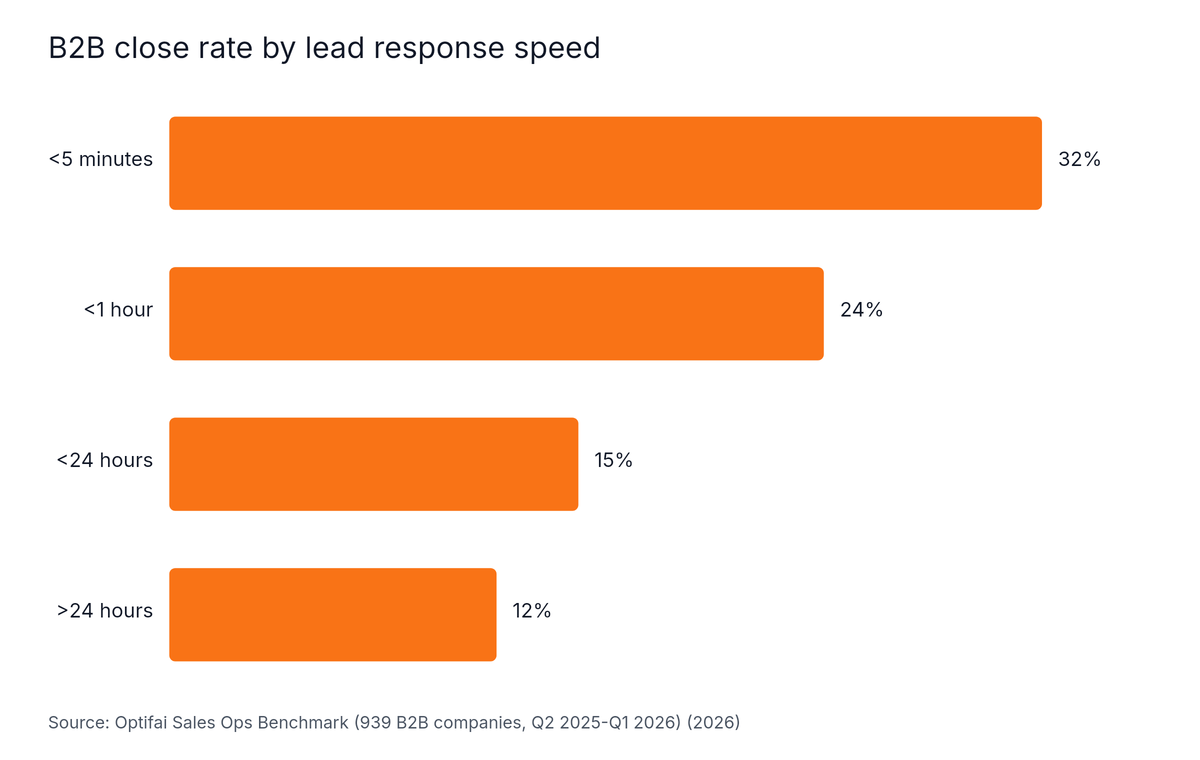
The timer matters because response speed varies widely. Only 23% of companies in the Optifai dataset respond within 5 minutes (Optifai Sales Ops Benchmark, 2026). Leads contacted in under 5 minutes close at 32%, against 12% for leads contacted after 24 hours. Optifai notes this is a correlation, not proven causation.
Horizontal Bar chart: B2B close rate by lead response speed. Highest: <5 minutes at 32%.
The chart shows the same pattern in Optifai's 2026 data: a 32% close rate under 5 minutes, 24% under one hour, 15% under 24 hours, and 12% beyond that (Optifai, 2026). A routing tool cannot make a rep call faster, but it removes the delay before the rep knows a lead exists.
Speed has limits as an argument. 6sense's 2025 Buyer Experience Report describes the buying journey shifting from a 70/30 to a 60/40 split between independent research and seller engagement (6sense, 2025). Buyers pick favorites earlier, so a fast reply helps most when the buyer already prefers the vendor.
One vendor-reported customer case shows the upside at enterprise scale. After automating data quality, lead routing time at one customer fell from 2+ days to under one hour (Openprise, 2026). It is a single case and will not match a small team's results.
Is native CRM assignment enough for a small team?
Native CRM assignment is often enough when a team has few reps, simple territories and moderate volume. A dedicated tool becomes worth evaluating when a team needs:
capacity-aware rotation that accounts for each rep's open workload
automatic rerouting after a missed response
an audit trail of why each lead went where it did
territory changes without developer time
Teams comparing options can use the criteria in lead routing software for B2B SaaS. Testing a routing rule set against a real funnel is the kind of question a free consultation covers: Meet with an expert.
Where does automation end and manual judgment begin?
Report automation tools and lead routing software end where a decision needs context. Tools refresh numbers and fire rules. People define stages and metrics, make forecast calls, handle named-account exceptions and explain a number to the CRO. In Default's 2026 survey of 300+ RevOps leaders, fewer than 10% of teams reported a positive AI impact on pipeline (Default, 2026).
A human hand adjusting one dial on a panel of automated switches
Default's own summary is short: "Less than 10% of teams see positive impact of AI on pipeline." (Default, 2026) Time savings and pipeline growth are separate outcomes. Automation delivers the first reliably. The second depends on decisions people still make.
Which decisions stay manual?
Stage and metric definitions. Revenue Wizards argues teams "need one governed definition that every dashboard, person and AI agent uses" (Revenue Wizards, 2026). A tool cannot choose that definition.
Forecast calls. A report shows the commit number. A person decides whether to trust it.
Named-account exceptions. Rules handle the pattern. A strategic account with a special owner needs an override.
Territory redesign. Routing applies a territory map. It does not decide whether the map is fair.
Explaining a number. A CRO asks why pipeline moved, and the answer needs context a dashboard lacks.
Why does bad data break automated reports and routing?
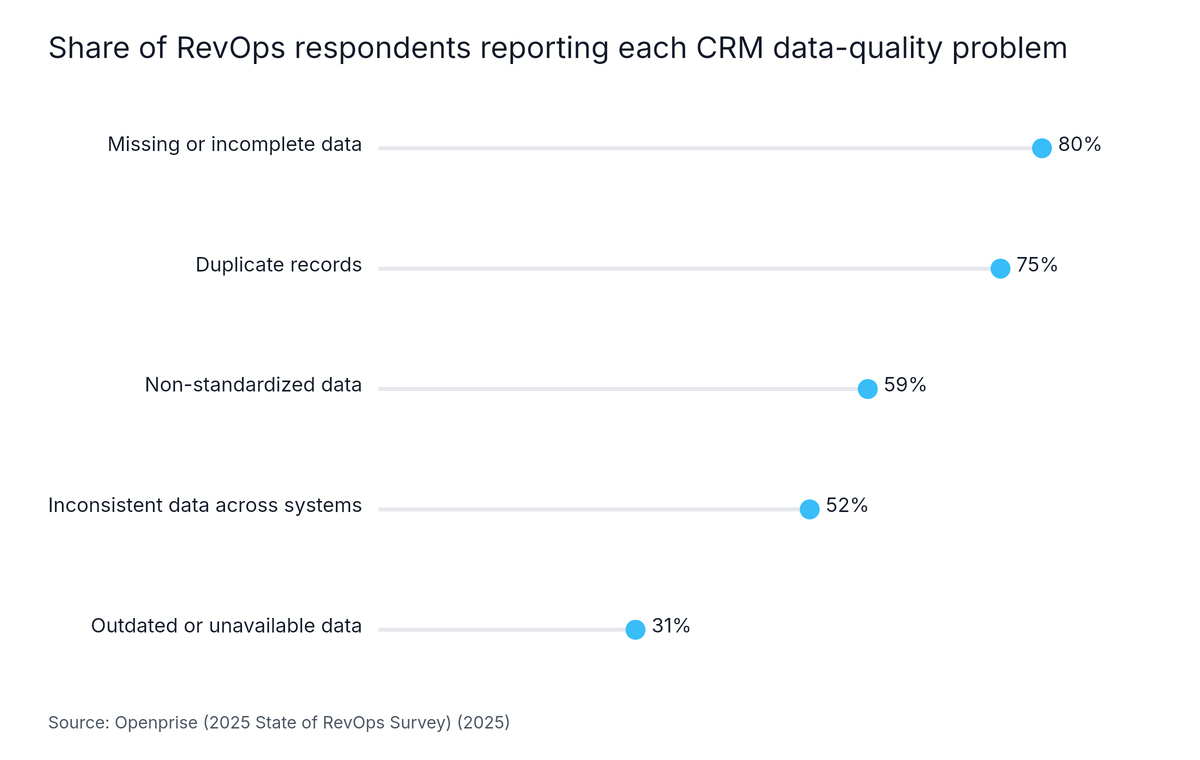
Automation repeats the CRM's data problems at speed. In the Openprise 2025 State of RevOps survey, 80% of respondents reported missing or incomplete data and 75% reported duplicate records (Openprise, 2025). A rule that routes by country fails when country is blank. A report that counts deals double-counts duplicates.
Lollipop chart: Share of RevOps respondents reporting each CRM data-quality problem. Highest: Missing or incomplete data at 80%.
The chart lists the full set from the same survey: missing or incomplete data at 80%, duplicate records at 75%, non-standardized data at 59%, inconsistent data across systems at 52%, and outdated or unavailable data at 31% (Openprise, 2025). Validate and enrich the fields a rule depends on before it fires. When ad-sourced leads arrive without source fields, ad click tracking breaks between the platform and the CRM, and source-based reports and rules inherit the gap.
Should a team of one automate reporting or lead routing first?
A RevOps team of one should usually automate the weekly pipeline report first and lead routing second, unless inbound volume is high and leads are waiting. Reporting returns the same hours every week and exposes data problems early. Optifai's 2026 benchmark of 939 B2B companies found a 47-hour average first response (Optifai, 2026), so high inbound volume can flip the order.
Two numbered stepping stones leading across a shallow stream toward a green bank
Situation
Start with
Reason
Few inbound leads, weekly report takes hours
Report automation
Saves recurring time and surfaces data gaps
High inbound volume, leads wait in a shared inbox
Lead routing
Response delay costs the most here
Both are painful, data is messy
Data cleanup, then reporting
Both tools depend on clean fields
Marketing and sales dispute the numbers
Stage definitions, then reporting
A shared definition comes before any automation
A practical sequence for a one-person team:
Write down the stage definitions the report and routing rules will use.
Check the fields both depend on, such as country, segment, owner and source.
Automate the weekly pipeline report with a scheduled refresh and a fixed recipient list.
Add routing rules for the simplest case, usually round-robin within one segment.
Add an SLA timer with a fallback owner.
Build a small routing report: SLA compliance, lead aging and reassignment rate.
SLA compliance is the share of leads that receive a first response within the target time. Lead aging is the time a lead has waited since assignment without a first response. Step 6 connects the two categories: routing produces data worth reporting, and report automation keeps the routing rules honest.
Measure hours saved yourself. No verified benchmark exists for small teams. Log the time the manual report and manual assignment take for two weeks, then compare after setup. The 12 hours per week figure from ZoomInfo's 2025 survey is self-reported by AI users, so do not use it as a target.
Who should not automate reports and lead routing yet?
Report automation tools and lead routing automation software are a poor fit for teams without a CRM, with unreliable CRM data, or with so few leads that manual assignment takes minutes. Openprise's 2025 survey found 80% of respondents have missing or incomplete data (Openprise, 2025), and automation repeats those gaps at machine speed.
A cracked pipe section with water leaking beside an intact pipe, showing a flaw automation would repeat
Four cases call for waiting or for a different first step:
No CRM yet. Without a system of record, there is nothing to connect.
No agreed stage definitions. A scheduled report of a disputed number only spreads the dispute faster.
Very low lead volume. If assigning takes a minute a day, a rule engine adds more upkeep than it saves.
Heavy exception handling. If most leads need a judgment call, rules will not fit yet.
What does lead routing automation software handle automatically?
Lead routing automation software handles assignment, rotation, escalation and reminders without manual work. It applies territory and account rules, rotates leads among eligible reps, starts a response timer on every new lead, and reassigns or alerts a manager when the timer expires. People still write the rules, maintain the data and decide exceptions.
What is the difference between round-robin and territory-based lead routing?
Round-robin rotates leads among eligible reps in order, while territory-based routing assigns a lead by region, segment or account owner. Round-robin spreads volume evenly across a team. Territory routing keeps ownership consistent. Most B2B SaaS teams combine them: territory picks the group, then round-robin picks the rep inside it.
Is native CRM lead assignment enough for a small RevOps team?
Native CRM lead assignment is often enough when a team has few reps, simple territories and moderate lead volume. A dedicated routing tool becomes worth evaluating when the team needs capacity-aware rotation, automatic rerouting after a missed response, an audit trail, or territory changes without developer time.
How much time can a small RevOps team save by automating reports and routing?
No verified benchmark exists for small teams. ZoomInfo's 2025 survey of more than 1,000 go-to-market professionals reports 12 hours per week reclaimed from manual data tasks by teams using AI, but the figure is self-reported and the publisher sells AI tools. Measure your own hours before and after.
What should a small RevOps team take from this?
Report automation tools and lead routing automation software remove repeatable work from a small RevOps team and leave judgment calls with people. A team of one should write stage definitions, check data fields, and automate the weekly pipeline report first. Optifai's 2026 benchmark of 939 companies found a 47-hour average first response (Optifai, 2026), which is where routing helps next.
Definitions, forecast calls, exceptions and explanations stay with people.
Clean the fields first, because automation repeats data errors.
Measure your own hours saved before and after.
To test a reporting or routing setup against a real funnel, book a free call: Meet with an expert.
Written by
Ishan Manchanda
Ishan Manchanda is co-founder of GrowthSpree, a B2B SaaS marketing consultancy founded in 2017 that has managed $60M+ in ad spend across 300+ B2B SaaS companies. He focuses on demand generation, go-to-market strategy and pipeline growth, and has been featured in Silicon Valley Times, SaaS Mag and the Unbounce podcast.
 Ishan ManchandaNov 14, 2026