
Blog
Marketing Attribution Models: How They Work and Which Fits a Long B2B Sales Cycle
Every marketing attribution model defined - first-touch to data-driven - and how a median 84-day B2B SaaS sales cycle changes which one you should use.
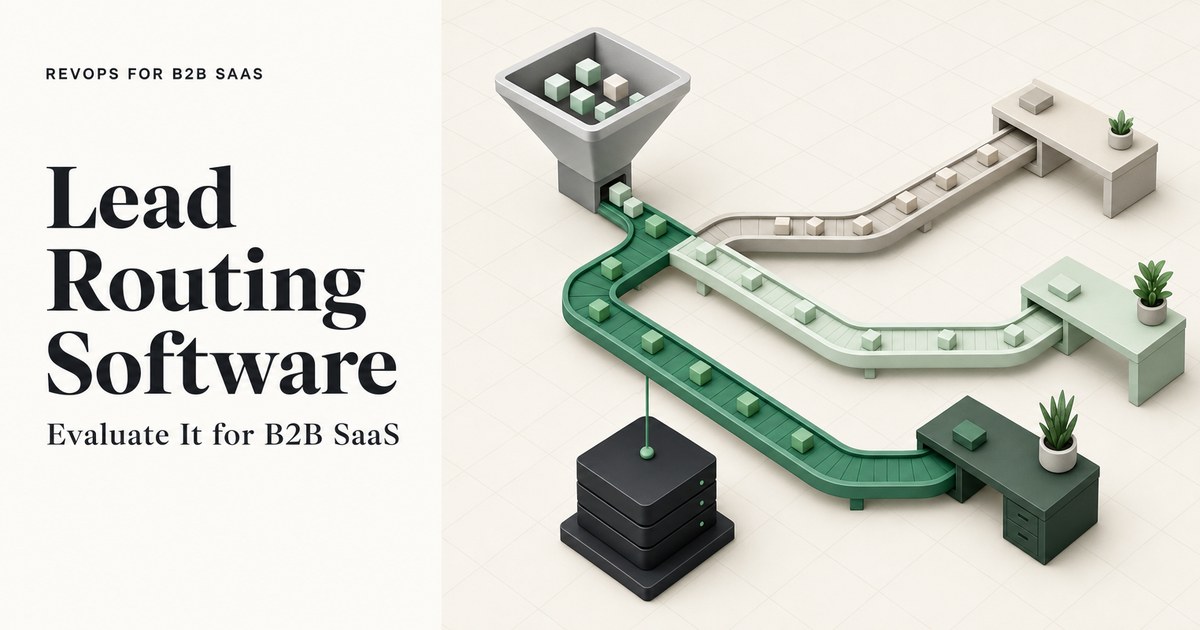
Learn what lead routing software does, how lead-to-account matching works, and which criteria separate point solutions from CRM-native routing for B2B SaaS teams.
Every marketing attribution model defined - first-touch to data-driven - and how a median 84-day B2B SaaS sales cycle changes which one you should use.

B2B SaaS sales conversion rate benchmarks by funnel stage and channel, with source labels that distinguish verified samples from unsampled ranges.

Learn what attribution models are, how each type works in a B2B SaaS funnel, and what a Series A team needs before any model gives reliable results.
Request a quote and our experts will contact you within 24 hours with tailored solutions and pricing.
Last updated: Oct 19, 2026
By RevOps for B2B SaaS Editorial Team | Last updated: October 13, 2026
Lead routing software is a system that automatically assigns an inbound lead to the correct sales rep the moment it enters the customer relationship management (CRM) platform, using rules based on territory, account ownership, rep capacity, or deal type. For B2B SaaS teams spending $600 to $2,500 per sales-qualified lead (SQL), the difference between a same-hour assignment and a Tuesday callback on a Friday demo request is often the difference between a pipeline opportunity and a lost investment.
In a 2024 independent test, 63.5% of 1,000 B2B SaaS companies never replied to a demo request at all (DigitalApplied, citing RevenueHero, 2024). This guide explains what lead routing software does, how lead-to-account matching works technically, and what criteria separate a point solution from a CRM's native capability - so the next evaluation starts from the right questions.
Key Takeaways
- Lead routing software replaces manual inbox review with automatic assignment, cutting average response time from roughly 13 hours to 3 hours 32 minutes in companies using automation (Workato, cited by OutSales.ai, 2024).
- Leads contacted in under 5 minutes close at 32%; leads contacted after 24 hours close at 12% - a 2.6x gap (Optifai Pipeline Study, 2026).
- Organizations without lead-to-account matching misroute an estimated 15 to 25% of leads to the wrong rep or a generic queue (RevOps Report, cited by DigitalApplied, 2026).
- CRM-native routing handles simple, low-volume scenarios; a point solution is justified when matching, territory hierarchies, or SLA enforcement are required.
- The lead-to-account matching and routing software market is projected to reach USD 6.6 billion by 2035, up from USD 2.6 billion in 2025 (Future Market Insights, 2025).
Lead routing software is a system that automatically assigns an inbound lead to the correct sales rep the moment it enters the CRM, using rules based on territory, account ownership, rep capacity, or deal type. For B2B SaaS teams, it replaces the manual review step that adds an average of 13 hours to response time without automation, protecting a cost-per-SQL investment that runs $600 to $2,500 per qualified lead (Promethean Research, cited by The Starr Conspiracy, 2024).

Revenue operations (RevOps) teams use lead routing software to enforce three things at once: speed (assign before a rep can manually find the lead), accuracy (assign to the rep who owns the account or territory), and coverage (never let a lead fall into a queue with no owner). When all three fail together, the result is the Friday-to-Tuesday gap - and a qualifying lead that the cost-per-SQL budget has already paid for.
Most lead routing software supports some combination of these assignment models:
| Routing Model | How Assignment Works | Best Fit |
|---|---|---|
| Round-robin | Leads cycle evenly across all eligible reps | Equal distribution, no territory logic |
| Territory | Leads assigned by geography, industry, or firmographic segment | Named account or regional sales motions |
| Weighted round-robin | Reps receive leads in proportion to a set weight (e.g. 60/40) | Capacity differences between reps |
| Capacity-aware | Assignment pauses when a rep's open lead count exceeds a threshold | High-volume inbound teams |
| Skills-based | Leads match to reps by product line, language, or deal size | Complex, multi-product or multilingual teams |
Most B2B SaaS teams at Series A to Series B start with territory or round-robin and add capacity-aware logic as headcount grows. Skills-based routing is more common in teams with 10 or more sales reps and multiple product lines.
The Friday-to-Tuesday gap happens because manual lead routing relies on a human to check a shared inbox, review the lead, and assign it - a process that stalls entirely outside business hours. Across 939 B2B companies tracked from Q2 2025 to Q1 2026, the average lead response time was 47 hours and only 23% of companies responded within 5 minutes (Optifai Pipeline Study, 2026). Manual routing alone accounts for 34% of those delays, according to Drift's 2025 research (GreenNow, citing Drift, 2025).

Drift's 2025 research breaks down the primary causes of lead response delays into four categories: manual lead routing (34%), leads routed to generic inboxes (28%), off-hours submissions (22%), and rep overload or prioritization failures (16%) - all cited by GreenNow, citing Drift (2025).
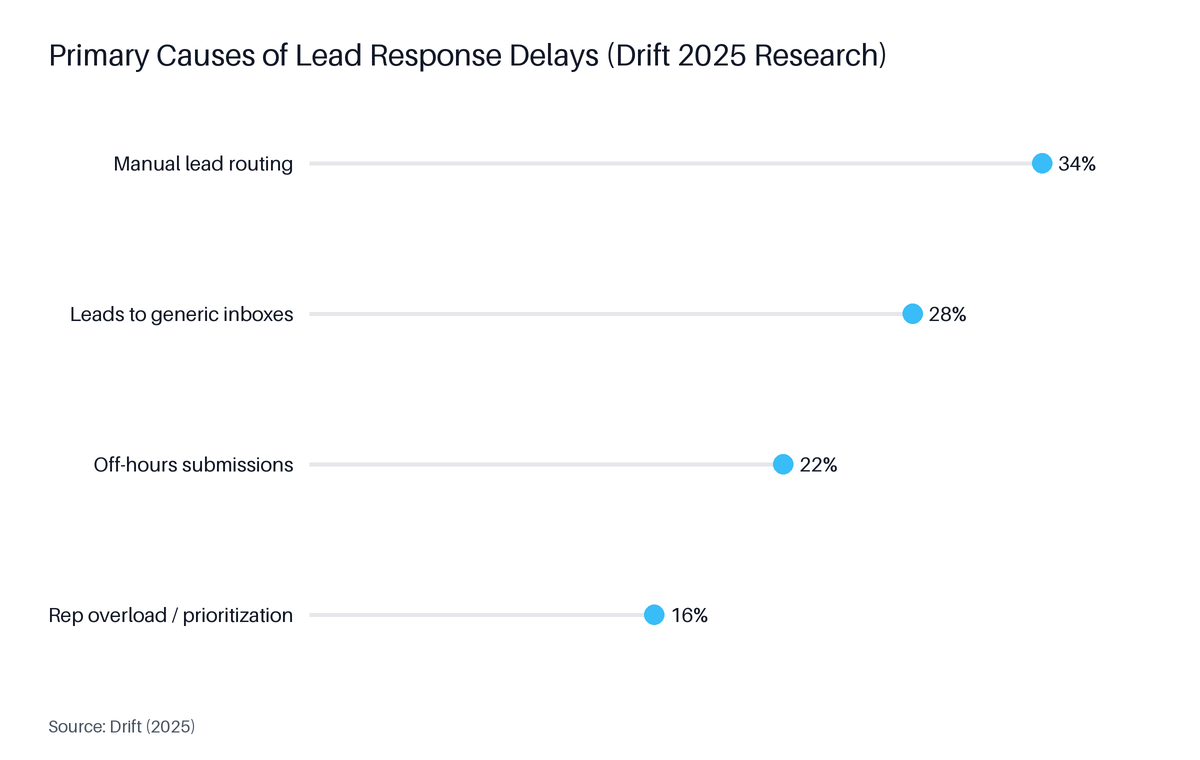
Source: Drift, 2025
The dollar impact compounds quickly. Consider a team generating 20 SQLs per month at a median cost of $1,500 each: that is $30,000 in SQL spend per month. If 15 to 25% of those leads are misrouted or stall in the queue past the 24-hour window, the close rate on those leads drops from 32% to 12%. Using the midpoint of the 15 to 25% misroute range - approximately 20% - that is 4 leads per month where the conversion gap represents roughly 0.8 closed deals that the cost-per-SQL budget has already paid for.
Data point: A 2024 independent test found 63.5% of 1,000 B2B SaaS companies never replied to a demo request at all (DigitalApplied, citing RevenueHero, 2024).
Automated lead routing software closes the response-time gap by triggering assignment the instant a form is submitted, bypassing the shared inbox entirely. Companies using routing automation responded in 3 hours 32 minutes on average, compared to roughly 13 hours without it (Workato, cited by OutSales.ai, 2024). For after-hours and weekend submissions, the software either queues the lead for the next business-hour slot or alerts an on-call rep immediately.
After-hours lead handling is where manual routing fails most predictably. Automated routing software addresses it through one of three mechanisms:
Each mechanism prevents the Friday-to-Tuesday gap by removing the dependency on a human check-in between submission and first contact.
Lead-to-account matching is a data-matching process that checks an inbound lead's attributes against existing CRM account records before assigning the lead to a rep. Organizations without lead-to-account matching misroute an estimated 15 to 25% of leads to the wrong rep or a generic queue (RevOps Report, cited by DigitalApplied, 2026). Catching those misroutes at the point of entry prevents duplicate account records and the pipeline loss that follows when a competitor rep calls an existing customer.
A matching engine evaluates the inbound lead against existing CRM records using these attributes, in approximate order of reliability:
| Attribute | What It Checks | Reliability |
|---|---|---|
| Email domain | Company domain against account domain field | High - direct match |
| Company name (fuzzy match) | Name variants, abbreviations, legal vs. trading names | High when tuned |
| IP address | Lead IP against known account IP ranges | Medium |
| Firmographic data | Industry, employee count, revenue range | Medium - enrichment-dependent |
| Parent/subsidiary hierarchy | Subsidiary domain matched to parent account | High when hierarchy data exists |
| Technographic overlap | Known tech stack associated with account | Low - requires enrichment |
When the match confidence score exceeds a defined threshold, the lead is routed to the rep who owns the matched account. When confidence is below threshold, the lead can fall to a rules-based tiebreaker (territory or round-robin) or flag for manual review. Most teams set a secondary routing fallback rather than leaving low-confidence leads unassigned.
Routing software protects cost-per-SQL spend by ensuring every qualified lead reaches the right rep within minutes rather than hours. Leads contacted in under 5 minutes close at 32%, versus 12% for leads contacted after 24 hours - a 2.6x difference (Optifai Pipeline Study, 2026). When cost per SQL for B2B SaaS ranges from $600 to $2,500 (Promethean Research, cited by The Starr Conspiracy, 2024), each misrouted or stalled lead represents a direct loss with no recovery path.
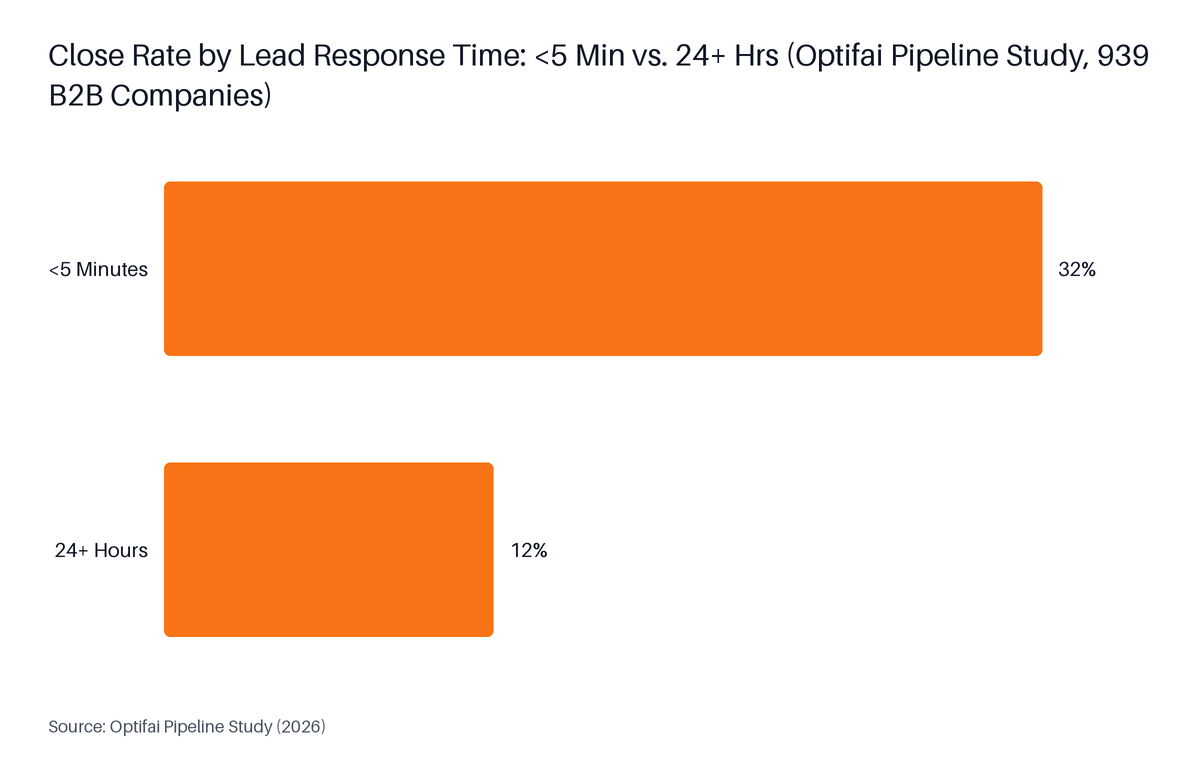
Source: Optifai Pipeline Study, 2026
Among B2B SaaS companies specifically, only 28% respond within 5 minutes, with an average response time of 38 hours (Optifai Pipeline Study, 2026). That 38-hour gap is where the SQL spend evaporates. A routing system that moves response from 38 hours to under 5 minutes does not change the cost per SQL - but it changes how many of those SQLs convert into pipeline.
For context, 78% of B2B buyers are estimated to purchase from the company that responds first to their inquiry (GreenNow, aggregating multiple industry studies, 2026). That figure is drawn from aggregated industry research rather than a single controlled study, so treat it as directional. The Optifai 939-company dataset - a controlled, CRM-timestamp study - provides the more reliable 32% vs. 12% close rate comparison.
Our data: GrowthSpree's audit of 104 B2B SaaS Google Ads accounts found a published median cost of $800 to $2,500 per SQL (GrowthSpree, April 2026). Cost per SQL tracked pipeline outcomes at a correlation of 0.71 across 1,412 ad variants - making it the metric most tightly linked to revenue of any paid ads measure in the dataset.
CRM-native routing is the assignment logic built into a CRM platform such as HubSpot or Salesforce - adequate for simple rules but limited in matching accuracy, SLA enforcement, and scale. A point solution is a dedicated routing tool that sits above the CRM and handles logic the native engine cannot. Manual assignment accounts for 34% of lead response delays (GreenNow, citing Drift, 2025) - the failure mode that static CRM rules cannot resolve as volume grows. As Distribution Engine's 2026 guide states, "native routing breaks at scale - static rules create bottlenecks, burnout, and missed opportunities as volume grows" (Distribution Engine, 2026).

Use this framework to identify which path fits the team's current state:
| Trigger | CRM-Native Sufficient | Point Solution Needed |
|---|---|---|
| Routing rule count | Fewer than 10 conditions | 10 or more conditions, or nested logic |
| Lead-to-account matching | Not required or done manually | Required - existing accounts must own new leads |
| Territory hierarchy | Flat (no parent/subsidiary) | Multi-level (parent, subsidiary, region) |
| SLA enforcement | Manual follow-up tracking | Auto-reassignment timers, manager alerts |
| Rep capacity weighting | Not used | Weighted or capacity-aware assignment |
| Monthly lead volume | Under 200 | Over 200 or growing fast |
| CRM platform | HubSpot Starter or Pro | Salesforce with complex objects |
No single trigger makes the case alone. A team with 500 leads per month, flat territory, and no account matching requirement may be fine with CRM-native routing. A team with 150 leads per month, an existing account base of 2,000 named accounts, and a territory model will need matching logic that no CRM native engine provides out of the box.
SLA enforcement is a routing layer that monitors whether an assigned lead is contacted within a defined time window and automatically reassigns or escalates it when the window expires. Most CRM-native routing does not include this layer - it assigns the lead but does not track whether the rep acted. Point solutions add:
SLA enforcement matters most in teams where rep follow-up is inconsistent. Without it, routing software solves the assignment problem but not the follow-up problem.
A B2B SaaS team evaluating lead routing software solutions should assess five areas: routing logic depth (round-robin, territory, weighted capacity, skills-based), lead-to-account matching quality, CRM compatibility and data sync speed, SLA enforcement capability, and after-hours handling. Each criterion maps to a failure mode in manual routing. The evaluation should start from the team's current bottleneck - misroutes, slow response, or rep overload - rather than from a feature list.

The global lead-to-account matching and routing software market is projected to grow from USD 2.6 billion in 2025 to USD 6.6 billion by 2035 at a compound annual growth rate of 9.6% (Future Market Insights, 2025), with cloud-based deployment commanding 64.3% of the market. That growth reflects enterprise investment in routing as a revenue protection mechanism, not just an operational convenience.
Tool categories to compare include: assignment-first solutions that focus on matching and territory (appropriate for Salesforce teams with named account models), scheduling-native tools that capture meeting bookings at the point of routing (appropriate for teams where speed-to-meeting is the primary metric), and CRM-embedded routing that adds logic without a separate tool layer.
Lead routing software evaluation is not the right priority for B2B SaaS teams that have no CRM yet, route fewer than 50 leads per month, or operate a single-rep sales motion with no territory logic. For those teams, the overhead of evaluating and implementing a point solution exceeds the benefit. Median private B2B SaaS companies spend 8% of annual recurring revenue (ARR) on marketing (SaaS Capital, June 2026, 1,000+ companies) - at the earliest stages, that budget is better directed at lead generation before routing infrastructure.
CRM-native routing or a simple assignment rule inside HubSpot or Salesforce covers the need until lead volume and routing complexity grow. The decision framework in the section above identifies the specific triggers that justify a point solution investment.
This guide is also not a substitute for reading vendor documentation. Tool features, limits, and prices change; the five criteria above apply regardless of which vendor's documentation a team is reviewing at the time of evaluation.
Automated lead routing software assigns an inbound lead to the right sales rep within seconds of form submission, using predefined rules for territory, account ownership, and rep availability. It bypasses the shared inbox and the manual review that typically add 13 or more hours to response time. For after-hours submissions, it either queues the lead for the next business-hour slot or triggers an immediate alert to an on-call rep, so no demo request sits uncontacted over a weekend.
Lead-to-account matching and routing software checks the inbound lead's email domain, company name using fuzzy-match logic to handle abbreviations and misspellings, IP address, and firmographic data against existing CRM account records. It also evaluates parent and subsidiary relationships to catch hierarchy mismatches. When a match is found, the lead is routed to the rep who owns that account, preventing a duplicate record or a drop into a generic queue.
Companies using lead-routing automation responded in 3 hours 32 minutes on average, compared to roughly 13 hours without it - a reduction of approximately 9.5 hours per lead (Workato, cited by OutSales.ai, 2024). Across the broader B2B market, the average response time is 47 hours and only 23% of companies respond within 5 minutes (Optifai Pipeline Study, 2026). For B2B SaaS specifically, the average is 38 hours, with 28% responding within 5 minutes.
The main alternatives to manual lead routing are: CRM-native routing rules, which automate assignment within the existing platform at no extra tool cost but with limited matching logic; assignment-first point solutions that add lead-to-account matching, territory logic, and SLA enforcement on top of the CRM; and scheduling-native tools that route and capture a meeting booking in one step, eliminating the shared inbox review that accounts for 34% of lead response delays (GreenNow, citing Drift, 2025).
CRM-native routing works when routing rules are simple (fewer than 10 conditions), team size is small, and lead volume is low. A point solution becomes necessary when lead-to-account matching is required, territory hierarchies are complex, or SLA enforcement and auto-reassignment are needed. As Distribution Engine's 2026 guide notes, "native routing breaks at scale - static rules create bottlenecks, burnout, and missed opportunities as volume grows" (Distribution Engine, 2026). The decision turns on rule count, CRM platform, and whether misroutes are already visible in pipeline data.
Lead routing software solves one specific failure: a qualified lead costing $600 to $2,500 to acquire, assigned to no one or the wrong person, called back four days late. The data is consistent. Leads contacted in under 5 minutes close at 32%; leads contacted after 24 hours close at 12%. Automation cuts average response from 13 hours to under 4. Lead-to-account matching eliminates the 15 to 25% misroute rate that follows when the CRM has no matching logic.
The evaluation decision is not primarily about which tool to buy. It is about identifying which failure mode is costing pipeline now: slow response, misroutes, or no SLA enforcement. Start there, match the failure mode to the capability category, then read vendor documentation for the tools in that category.
For teams ready to map their current routing setup against these criteria, RevOps for B2B SaaS offers a free consultation with a RevOps expert. Bring the funnel question; come away with a concrete next step.
Meet with an expert
© 2026 revopsforb2bsaas.com All rights reserved.